
Everything You Need to Run Your Business
|
Scroll to explore features
Premium Features That Set Us Apart
Discover the tools that make managing your business effortless
Access Anywhere, Anytime
Work from any device with an internet connection. Whether you're at your store, at home, or on the go, your entire business is accessible through our cloud-based platform. No installation required—just log in and start managing your operations instantly.
- Works on desktop, tablet, and mobile devices
- No software installation needed
- Secure cloud infrastructure
- Automatic updates and backups
Selfie Attendance & Biometric Login
Say goodbye to time cards and PIN codes. Staff can clock in with a quick selfie using facial recognition technology. This modern attendance system prevents buddy punching, tracks exact work hours, and keeps your team accountable—all while being incredibly easy to use.
- Face recognition for secure login
- Selfie-based attendance tracking
- Prevents time theft and buddy punching
- Works on any device with a camera
- Instant authentication in seconds
Real-Time Data Synchronization
Every sale, every inventory update, every change syncs instantly across all your devices and locations. Make a sale on your tablet, and it immediately appears on your phone and desktop. Multiple branches? They all share the same real-time data, giving you complete visibility of your entire operation.
- Instant sync across all devices
- Multi-branch data consolidation
- Live inventory updates
- Never miss a transaction
Core Operations Made Simple
Everything you need to run your business efficiently
Lightning-Fast POS Interface
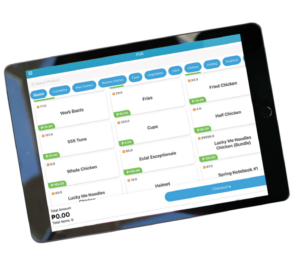
Process sales in seconds with our touch-optimized interface. Scan barcodes, search products manually, apply discounts, and accept multiple payment methods—all in a streamlined workflow designed for speed.
Intelligent Inventory Control
Your inventory updates automatically with every sale. Get low stock alerts before you run out, track expiry dates for perishables, and identify your best-selling products with built-in analytics.
Comprehensive Dashboard
See your entire business at a glance. Beautiful graphs and charts show your sales trends, expenses, profits, and key metrics in real-time. Make informed decisions with data that's always up-to-date.
Advanced Business Reports
Generate detailed reports for any time period—daily, weekly, monthly, or yearly. Track top-selling products, monitor staff performance, analyze sales trends, and export data for accounting purposes.
Complete Staff Management
Empower your team while maintaining control
User Accounts & Roles
Create individual accounts for each staff member with customized access levels. Assign roles like Cashier, Manager, or Admin—each with specific permissions that control what they can see and do.
- Custom username or PIN assignment
- Role-based access control
- Restrict sensitive data access
- Manager override permissions
Attendance & Shift Tracking
Staff clock in and out directly through the POS system with selfie verification. Track total hours worked, flag late arrivals, and generate end-of-shift reports showing cash counts and daily summaries.
- Selfie-based clock in/out
- Automatic hours calculation
- Late arrival notifications
- End-of-shift Z-Read reports
Performance Monitoring
Track sales performance by individual staff member. See who's your top performer, identify training needs, and reward excellence with concrete data. All voids, discounts, and special actions are logged for accountability.
- Individual sales tracking
- Performance leaderboards
- Action logging (voids, discounts)
- Training needs identification
Customer Management & Loyalty Programs
Build lasting relationships with your customers
Customer Profiles & History
Create detailed customer profiles during checkout. Store contact information, tag VIP customers, and access complete purchase history with a single click. Know your best customers and personalize their experience.
Loyalty Points System
Reward repeat customers automatically. Set up your own points system—for example, ₱1 = 1 point, and 100 points = ₱10 off. Points are earned and tracked automatically at checkout, encouraging customers to return.
Easy Points Redemption
At checkout, staff can instantly see available points and apply rewards with one click. The system prompts them to inform customers about their points balance, making it effortless to promote your loyalty program.
More Powerful Features
Everything else you need for complete business control
Product Management
Organize products by category, set pricing structures, assign SKUs, and manage variants effortlessly.
Multiple Payment Methods
Accept cash, cards, e-wallets, and more. Support partial payments and installment plans seamlessly.
Cash Flow Management
Monitor every peso coming in and going out. Track cash register adjustments and daily cash flow precisely.
Multi-Branch Support
Manage multiple locations from one central system. View consolidated or individual branch performance.
Barcode System
Scan products instantly for faster checkout. Generate and print custom barcodes for your inventory.
Automatic Backups
Your data is automatically backed up to the cloud. Create restore points and protect your business data.
Discounts & Promotions
Set up automatic discounts, run sales campaigns, create bundle deals, and track promotional performance.
5-Minute Setup
Get started immediately with our intuitive setup wizard. No technical skills or expert assistance required.
Training & Support Resources
We make sure you succeed from day one
Welcome & Introduction
Start with our welcome video that walks you through the system overview, showing you where everything is and how it all works together.
Dashboard Tour
Learn to navigate your dashboard, understand the menu layout, and discover the difference between mobile and desktop versions.
Processing Sales
Master the basics: scanning products, applying discounts, accepting different payment methods, and printing or sending receipts.
Inventory Tutorials
Learn how to add and update items, manage stock in/out, set up low stock alerts, and track expiry dates for perishables.
Reports & Insights
Generate powerful reports showing daily, weekly, and monthly sales, top-selling products, staff performance, and export data.
Troubleshooting & FAQs
Quick solutions for common issues like POS not opening, printer problems, forgotten passwords, and how to contact support.